fresnel 효과?
빛이 물체 표면에 닿을 때, 시야각(=입사각)에 따라 반사되는 빛의 양이 달라지는 현상
아래 사진을보면 멀리 있는 수면 위에는 나무가 그려진다. 가까이 있는 수면 그러니까 시선과 수직에 가까운 수면에는 물고기가 그려진다. 이것이 fresnel 효과이다.

이 효과를 적용할 때 일단은 빛의 굴절은 적용하지 않는 것으로 한다.
fresnel 함수를 보면 물질의 고유 특성과 노멀 값, eye pos 로 구현한다. 픽셀로 시선과 노멀을 내적으로 해서 가까운지 멀리있는지에 따라 값을 바꾸도록 f0 를 만든다.
return 에서 내적의 결과에 따라 가까울수록 물체의 고유 성질 fresnelR0 만 적용하고 멀리 있으면 f0 값이 더욱 많이 적용되도록 한다.
float3 SchlickFresnel(float3 fresnelR0, float3 normal, float3 toEye)
{
    // 참고 자료들
    // THE SCHLICK FRESNEL APPROXIMATION by Zander Majercik, NVIDIA
    // http://psgraphics.blogspot.com/2020/03/fresnel-equations-schlick-approximation.html

    float normalDotView = saturate(dot(normal, toEye));

    float f0 = 1.0f - normalDotView; // 90도이면 f0 = 1, 0도이면 f0 = 0

    // 1.0 보다 작은 값은 여러 번 곱하면 더 작은 값이 됩니다.
    // 0도 -> f0 = 0 -> fresnelR0 반환
    // 90도 -> f0 = 1.0 -> float3(1.0) 반환
    // 0도에 가까운 가장자리는 Specular 색상, 90도에 가까운 안쪽은 고유 색상(fresnelR0)
    return fresnelR0 + (1.0f - fresnelR0) * pow(f0, 5.0);
}
위의 fresnel 값을 specular 에 곱해주면 0~1 사이로 나오게 되고 더해주면 끝.
  float4 diffuse = g_diffuseCube.Sample(g_sampler, input.normalWorld);
  float4 specular = g_specularCube.Sample(g_sampler, reflect(-toEye, input.normalWorld));

  diffuse *= float4(material.diffuse, 1.0);
  specular *= pow((specular.r + specular.g + specular.b)/3.0, material.shininess);
  specular *= float4(material.specular, 1.0);

  // 참고: https://www.shadertoy.com/view/lscBW4
  float3 f = SchlickFresnel(material.fresnelR0, input.normalWorld, toEye);
  specular.xyz *= f;

  if (useTexture) {
      diffuse *= g_texture0.Sample(g_sampler, input.texcoord);
      // Specular texture를 별도로 사용할 수도 있습니다.
  }

  return diffuse + specular;
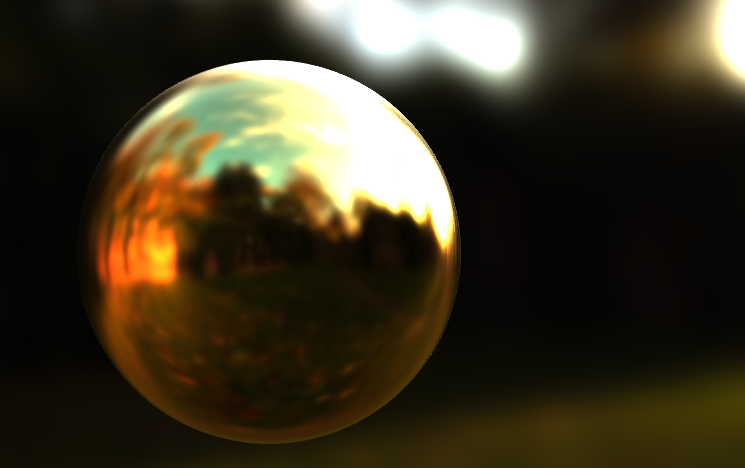
결과를 보면 배경의 흰색 조명이 구체의 주변 그러니까 시선의 먼 부분에는 더 많이 적용되고 가장 중심부 가까운 부분은 거의 IBL 이 적용되지 않는다.
'DX' 카테고리의 다른 글
| Bloom Filter 와 Post-Processing 정리 (0) | 2025.07.13 |
|---|---|
| Post Processing (0) | 2025.07.13 |
| 이미지 기반 라이팅 (0) | 2025.07.13 |
| 환경 매핑(반사 매핑) (0) | 2025.07.13 |
| 큐브 매핑 (0) | 2025.07.13 |


