큐브 맵(Cube Map)이란?
큐브맵은 정육면체 6개의 면에 이미지를 입힌 텍스처 형태
이 6면을 통해 360도 전 방향을 표현할 수 있어서, 주로 환경 반사, 하늘, 광원 효과, 스크린 프로브 등에 사용
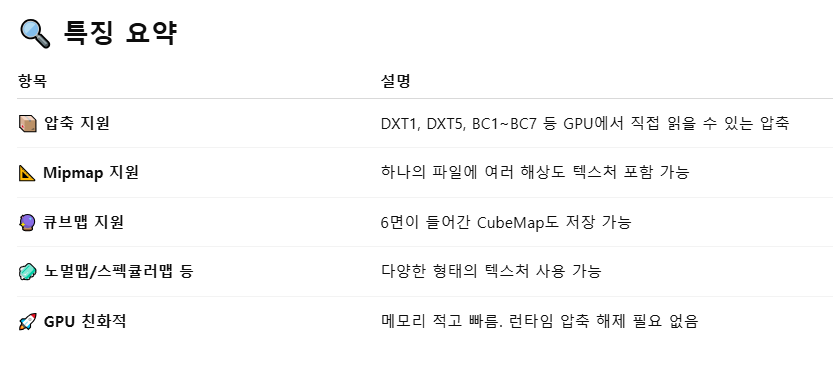
큐브 맵 같은 특수 텍스처를 사용하기 위해 DDS 파일 형식을 사용한다.
DDS 파일이란?
DDS (DirectDraw Surface)는 마이크로소프트가 만든 텍스처 전용 파일 포맷으로,
DirectX에서 그래픽 텍스처로 빠르게 사용하기 위해 설계된 압축된 바이너리 포맷입니다.
큐브 맵 전용 구조체.
큐브 맵은 렌더링 하고 싶은 세상을 감싸는 것이기 때문에 박스 메쉬를 가지고 있어야한다.
dds 파일로부터 큐브 맵 텍스처를 만들고 그 텍스처를 쉐이ㅏ더에 넣어줄 수 있도록 쉐이더 리소스 뷰를 만들어 저장.
using Microsoft::WRL::ComPtr;

struct CubeMapping {

    std::shared_ptr<Mesh> cubeMesh;

    ComPtr<ID3D11ShaderResourceView> cubemapResourceView;

    ComPtr<ID3D11VertexShader> vertexShader;
    ComPtr<ID3D11PixelShader> pixelShader;
    ComPtr<ID3D11InputLayout> inputLayout;
};
쉐이덩에겐느 큐브 맵 텍스처로 설정된 리소스 뷰만 넘겨주면 되기 때문에 texture 는 임시 변수로만 사용한다.
    // .dds 파일 읽어들여서 초기화
    ComPtr<ID3D11Texture2D> texture;
    auto hr = CreateDDSTextureFromFileEx(
        // this->m_device.Get(), L"./SaintPetersBasilica/saintpeters.dds", 0,
        this->m_device.Get(), L"./skybox/skybox.dds", 0, D3D11_USAGE_DEFAULT,
        D3D11_BIND_SHADER_RESOURCE, 0,
        D3D11_RESOURCE_MISC_TEXTURECUBE, // 큐브맵용 텍스춰
        DDS_LOADER_FLAGS(false), (ID3D11Resource **)texture.GetAddressOf(),
        this->m_cubeMapping.cubemapResourceView.GetAddressOf(), nullptr);
큐브 맵의 상수 버퍼를 생성하고, 박스 크기를 초기화한다. 카메라가 박스 안에 완전히 들어와야하기 때문에 크기를 크게한다.
 ComPtr<ID3D11Buffer> vertexConstantBuffer;
 ComPtr<ID3D11Buffer> pixelConstantBuffer;
 AppBase::CreateConstantBuffer(m_BasicVertexConstantBufferData,
                               m_cubeMapping.cubeMesh->vertexConstantBuffer);
 AppBase::CreateConstantBuffer(m_BasicPixelConstantBufferData,
                               m_cubeMapping.cubeMesh->pixelConstantBuffer);

 // 커다란 박스 초기화
 // - 세상이 커다란 박스 안에 갇혀 있는 구조입니다.
 // - D3D11_CULL_MODE::D3D11_CULL_NONE 또는 삼각형 뒤집기
 // - 예시) std::reverse(myvector.begin(),myvector.end());
 MeshData cubeMeshData = GeometryGenerator::MakeBox(20.0f);
 std::reverse(cubeMeshData.indices.begin(), cubeMeshData.indices.end());
큐브맵은 레이아웃에서 노멀이나 UV 를 사용하지 않는다. pos 만 있으면 된다.
    // 다른 쉐이더와 동일한 InputLayout 입니다.
    // 실제로는 "POSITION"만 사용합니다.
    vector<D3D11_INPUT_ELEMENT_DESC> basicInputElements = {
        {"POSITION", 0, DXGI_FORMAT_R32G32B32_FLOAT, 0, 0,
         D3D11_INPUT_PER_VERTEX_DATA, 0},
        {"NORMAL", 0, DXGI_FORMAT_R32G32B32_FLOAT, 0, 4 * 3,
         D3D11_INPUT_PER_VERTEX_DATA, 0},
        {"TEXCOORD", 0, DXGI_FORMAT_R32G32_FLOAT, 0, 4 * 3 + 4 * 3,
         D3D11_INPUT_PER_VERTEX_DATA, 0},
    };
모델과 뷰 행렬이 따로 있는건 모델 행렬을 바꾸면 오브젝만 변화가 생기지만 뷰 행렬을 바꾸면 바라보는 전체가 회전 이동하기 때문에.
아래 쉐이더 코드가 vs 를 보면 불필요한 컬러나 UV 가 포함되어 있는데 이건 그냥 일반적으로 쓰기 위함이다.
cbuffer BasicVertexConstantBuffer : register(b0)
{
    matrix model;
    matrix invTranspose;
    matrix view;
    matrix projection;
};

PixelShaderInput main(VertexShaderInput input)
{
    // 불필요한 멤버들도 VertexShaderInput을 통일시켰기 때문에 채워줘야 합니다.

    PixelShaderInput output;
    float4 pos = float4(input.posModel, 1.0f);

    pos = mul(pos, model); // Identity

    output.posWorld = pos.xyz;

    float4 normal = float4(input.normalModel, 0.0f);
    output.normalWorld = mul(normal, invTranspose).xyz;
    output.normalWorld = normalize(output.normalWorld);

    pos = mul(pos, view);

    pos = mul(pos, projection);
    output.posProj = pos;

    output.texcoord = input.texcoord;
    output.color = float3(1.0, 1.0, 0.0);

    return output;
}
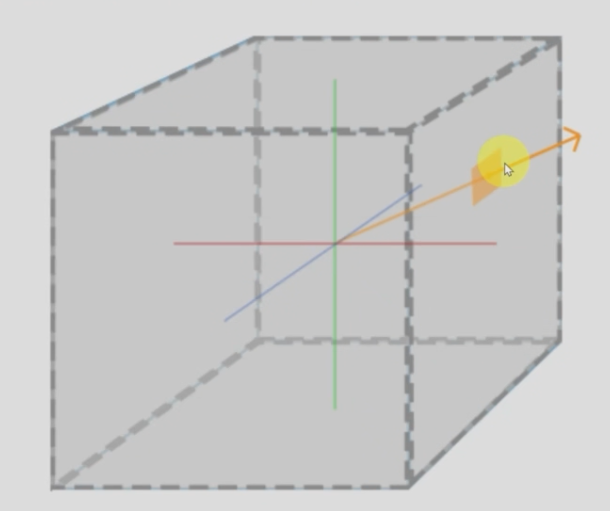
PS 에도 차이가 있는데 3차원 텍스처 좌표를 사용한다. 기존에는 UV 2가지 값을 사용했는데 큐브맵은 3가지 사용한다.
큐브 맵의 중심에서 바라보는 픽셀 쪽 방향을 알아야해서 FLOAT3 이다.
#include "Common.hlsli" // 쉐이더에서도 include 사용 가능

TextureCube g_textureCube0 : register(t0);
SamplerState g_sampler : register(s0);

float4 main(PixelShaderInput input) : SV_TARGET
{
    // 주의: 텍스춰 좌표가 float3 입니다.
    return g_textureCube0.Sample(g_sampler, input.posWorld.xyz);
}
Update 함수에서 큐브 맵 매쉬는 model 행렬을 적용하지 않는다. 다른 사람 모델링만 움직이고 배경인 큐브 맵은 안움직이기게 하기 위해서.
큐브 맵은 아주 멀리 있는 것을 가정하기 때문에 이동도 취소해야한다(주의)
// 큐브매핑을 위한 ConstantBuffers
m_BasicVertexConstantBufferData.model = Matrix();
// Transpose()도 생략 가능
Render 함수 코드
큐브 맵 매쉬를 렌더링 해준다.
    // 큐브매핑
    // TODO:
    m_context->IASetInputLayout(m_cubeMapping.inputLayout.Get());
    m_context->IASetVertexBuffers(
        0, 1, m_cubeMapping.cubeMesh->vertexBuffer.GetAddressOf(), &stride,
        &offset);
    m_context->IASetIndexBuffer(m_cubeMapping.cubeMesh->indexBuffer.Get(),
                                DXGI_FORMAT_R32_UINT, 0);
    m_context->IASetPrimitiveTopology(D3D11_PRIMITIVE_TOPOLOGY_TRIANGLELIST);

    m_context->VSSetShader(m_cubeMapping.vertexShader.Get(), 0, 0);
    m_context->VSSetConstantBuffers(
        0, 1, m_cubeMapping.cubeMesh->vertexConstantBuffer.GetAddressOf());
    ID3D11ShaderResourceView *views[1] = {
        m_cubeMapping.cubemapResourceView.Get()};
    m_context->PSSetShaderResources(0, 1, views);
    m_context->PSSetShader(m_cubeMapping.pixelShader.Get(), 0, 0);
    m_context->PSSetSamplers(0, 1, m_samplerState.GetAddressOf());

    m_context->DrawIndexed(m_cubeMapping.cubeMesh->m_indexCount, 0, 0);
}
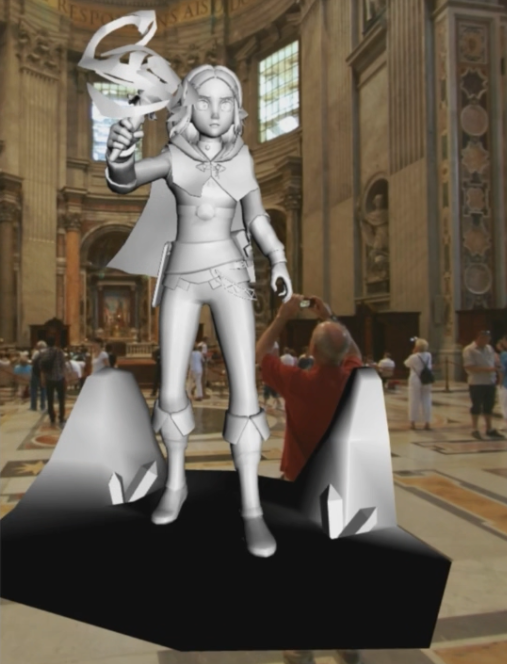
결과 렌더링 성공
'DX' 카테고리의 다른 글
| 이미지 기반 라이팅 (0) | 2025.07.13 |
|---|---|
| 환경 매핑(반사 매핑) (0) | 2025.07.13 |
| Rim Lighting 실습 (0) | 2025.07.13 |
| 구 매핑 (0) | 2025.07.13 |
| Subdivision (0) | 2025.07.12 |


