ComPtr 은 Com Object 에 대해 사용하는 일종의 스마트 포인터이다.
DX3d 에서 렌더링 할 때는 Com 인터페이스를 통해 간접적으로 렌더링하고 인터페이스가 그 렌더링 기능들을 제공한다.
Com 오브젝트를 만들 때는 Create 함수를 사용한다.
오브젝트를 옮길 때는 .As 함수를 성공 확인 시 FAILED ㅍ매크로를 사용해야한다.
GetAddressOf() 로 이중 포인터를 받아와서 적용할 수 있다. 대부분의 함수들이 이중 포인터 변수를 받기 때문에 자주 사용된다.
D3D 시작
그래픽 카드 제조사 입장에서 그래픽카드의 사용방법을 정리해 놓을 것을 플머가 사용하기 쉽게 되어 있는 것을 Graphics APIS 라고 한다. (DX, OpenGl 등등 )

실시간 렌더링 알고리즘, 쉐이더 프로그래밍의 중요도를 배우는 것이 목표이다.
기본 예제 확인
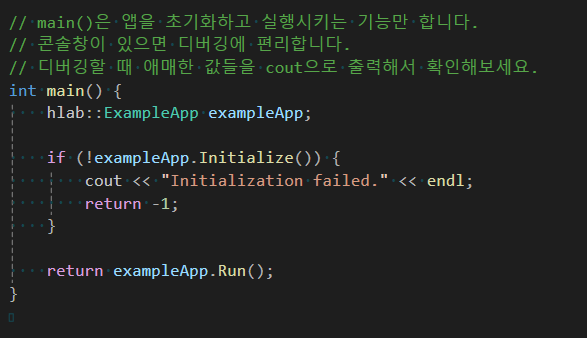
아래를 보면 main 에서는 초기화 및 Run 외에는 다른 작업을 하지 않고 ExampleApp 에서 실행 코드가 들어있다.
외부 sdk 등을 사용 할 때는 어느 경우에건 예외 처리 필수.
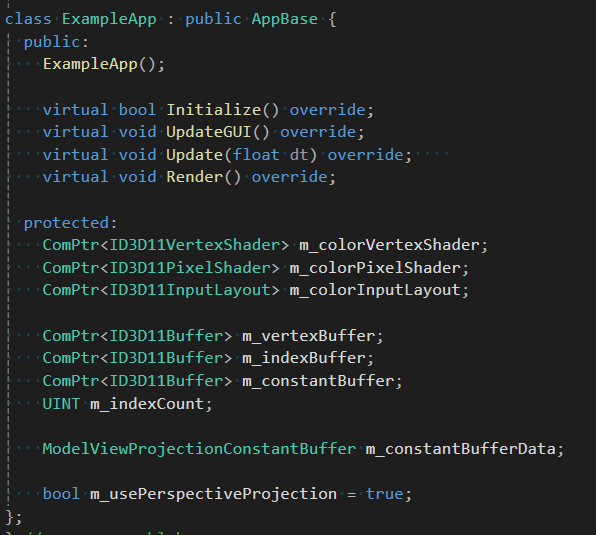
클래스를 보면 함수들이 오버라이드 해서 사용되어 진다.
생성자에서 무슨 일이 일어나는지 확인 하자

AppBase() 를 확인하자
ExampleApp::ExampleApp() : AppBase(), m_indexCount(0) {}
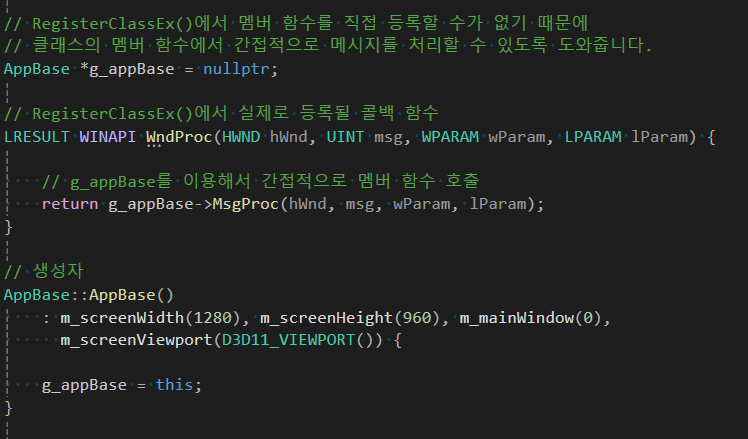
AppBase 의 생성자에서는 아래와 같이 실행된다. 여기서 알아두어야할것은 g_appBase 라는 전역 변수에 this 를 넣는 것이다.
이유는 윈도우 프로그래밍에서는 키보드, 마우스 등의 이벤트를 받을 수 있어야한다. 지금 이 코드로 인해 실행되는 프로그램의 이벤트 등을 받았을 때 윈도우에서는 특정 함수를 콜백 하게 되는데 그것이 WndProc 이다.
이 콜백 함수에는 전역 변수나 함수만 설정 가능하기 때문에 g_appBase 의 함수를 이용해 간접적으로 그 안에서 다시 멤버 함수를 호출 하도록 만드는 것이다.
다음으로 Initialize 를 확인한다.
bool ExampleApp::Initialize() {

    if (!AppBase::Initialize())
        return false;

    // Geometry 정의
    auto [vertices, indices] = MakeBox();

    // 버텍스 버퍼 만들기
    AppBase::CreateVertexBuffer(vertices, m_vertexBuffer);

    // 인덱스 버퍼 만들기
    m_indexCount = UINT(indices.size());

    AppBase::CreateIndexBuffer(indices, m_indexBuffer);

    // ConstantBuffer 만들기
    m_constantBufferData.model = Matrix();
    m_constantBufferData.view = Matrix();
    m_constantBufferData.projection = Matrix();

    AppBase::CreateConstantBuffer(m_constantBufferData, m_constantBuffer);

    // 쉐이더 만들기

    // Input-layout objects describe how vertex buffer data is streamed into the
    // IA(Input-Assembler) pipeline stage.
    // https://learn.microsoft.com/en-us/windows/win32/api/d3d11/nf-d3d11-id3d11devicecontext-iasetinputlayout

    // Input-Assembler Stage
    // The purpose of the input-assembler stage is to read primitive data
    // (points, lines and/or triangles) from user-filled buffers and assemble
    // the data into primitives that will be used by the other pipeline stages.
    // https://learn.microsoft.com/en-us/windows/win32/direct3d11/d3d10-graphics-programming-guide-input-assembler-stage

    vector<D3D11_INPUT_ELEMENT_DESC> inputElements = {
        {"POSITION", 0, DXGI_FORMAT_R32G32B32_FLOAT, 0, 0, D3D11_INPUT_PER_VERTEX_DATA, 0},
        {"COLOR", 0, DXGI_FORMAT_R32G32B32_FLOAT, 0, 4 * 3, D3D11_INPUT_PER_VERTEX_DATA, 0},
    };

    AppBase::CreateVertexShaderAndInputLayout(L"ColorVertexShader.hlsl", inputElements,
                                              m_colorVertexShader, m_colorInputLayout);

    AppBase::CreatePixelShader(L"ColorPixelShader.hlsl", m_colorPixelShader);

    return true;
}
뭐가 많은데 AppBase::Initialize 를 보면
3가지 일을 한다. 하나는 윈도우를 만들고 하나는 렌더링 파이프라인을 초기화하고 마지막으로 ImGUI 를 초기화한다.
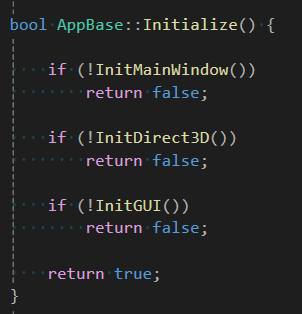
이 중 윈도우 초기화에서는 CreateWindow 와 변수로 가로 세로 해상도를 넘겨주어 툴바를 제외한 윈도우를 설정해준다.
'DX' 카테고리의 다른 글
| D3D11 렌더링 파이프라인 (0) | 2025.06.15 |
|---|---|
| D3D11 초기화 (0) | 2025.06.15 |
| DirectX Math (0) | 2025.06.06 |
| 조명, 노멀 벡터 변환 (GLM) (0) | 2025.06.06 |
| GLM (0) | 2025.06.06 |


